How Cloudflare CDN Works with WordPress, ReactJs, Django Applications, or Other Publicfacing applications.
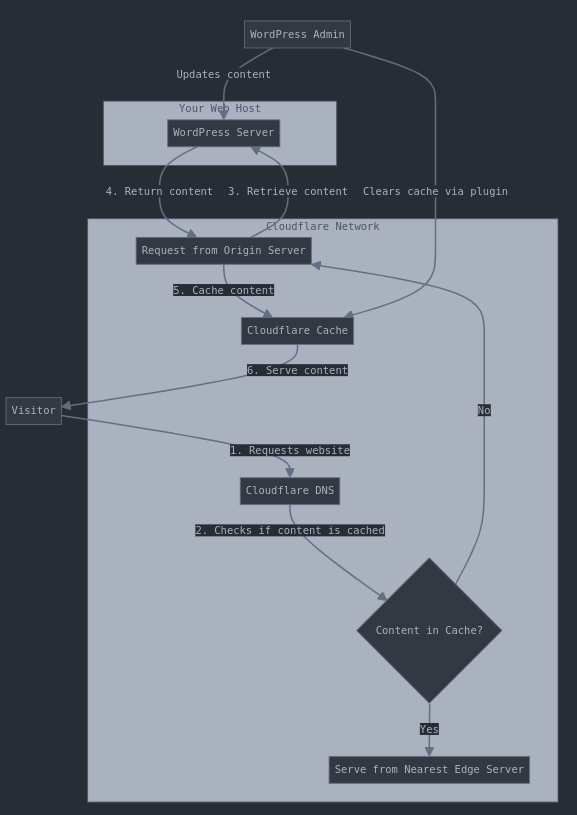
Basic Workflow
- DNS Configuration: You point your domain’s nameservers to Cloudflare
- Site Optimization: Cloudflare caches static content from your WordPress site
- Content Delivery: Visitors receive content from the nearest Cloudflare data center instead of your origin server
- Cache Management: WordPress plugins help manage cache invalidation when content changes
Detailed Implementation Steps
- Sign up for Cloudflare:
- Create a Cloudflare account
- Add your WordPress site to Cloudflare
- Change your domain nameservers to Cloudflare’s nameservers
- Install WordPress Plugin:
- Install and activate the official Cloudflare plugin or another cache management plugin like Object Cach pro
- Connect the plugin to your Cloudflare account
- Configure Cloudflare Settings:
- Enable caching for static content (images, CSS, JavaScript)
- Set cache expiration times
- Configure security settings (WAF, SSL, etc.)
- Content Update Process:
- When you update WordPress content, the plugin automatically purges relevant cached content
- New visitors will receive the updated content
This implementation gives you the benefits of global content delivery, DDoS protection, and improved page load times while maintaining the flexibility of your WordPress site.
CDN Integration with React and Django Applications
I’ll explain how Cloudflare CDN works with both React and Django applications, with workflow diagrams for each.
React Application with Cloudflare CDN

React + Cloudflare Implementation
- Build Process:
- Create production build of React app (npm run build)
- Upload build files to hosting service (AWS S3, Netlify, Vercel, etc.)
- Cloudflare Configuration:
- Point domain to Cloudflare nameservers
- Set Page Rules for caching static assets (JS, CSS, images)
- Configure cache TTL settings
- Cache Management:
- Use versioned filenames for assets (webpack generates hashed filenames)
- Implement cache purging in the CI/CD pipeline after deployments
- Set cache-control headers for optimal caching
- API Communication:
- React app communicates with API for dynamic data
- API responses can be cached at the Cloudflare level if appropriate
Django Application with Cloudflare CDN
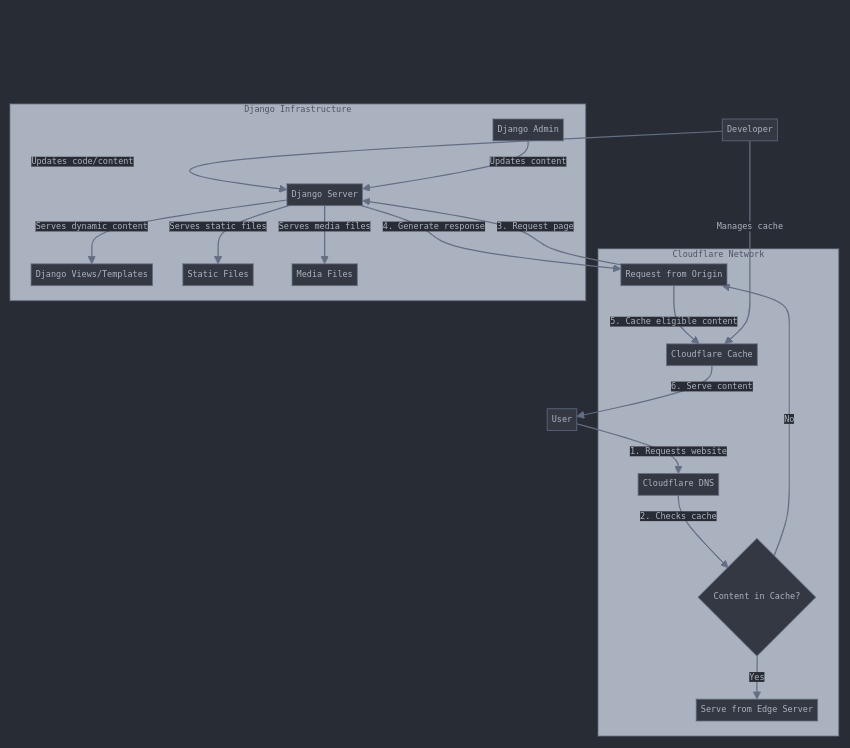
Django + Cloudflare Implementation
- Django Static Files Setup:
- Configure STATIC_ROOT and MEDIA_ROOT in settings
- Run collectstatic to gather static files
- Configure Django to use proper caching headers
- Server Configuration:
- Set up Django behind web server (Nginx, Apache)
- Configure the webserver to handle static files directly
- Set appropriate cache-control headers
- Cloudflare Setup:
- Point domain to Cloudflare nameservers
- Configure Page Rules:
- Cache static files aggressively
- Bypass cache for admin pages
- Selective caching for public pages
- Cache Management:
- Use Django signals to purge Cloudflare cache when content changes
- Implement Cloudflare API in Django for cache management
- Use versioned URLs for static content when possible
Key Differences Between Frameworks
- React (Client-side rendering):
- The entire application can be cached as static files
- API calls happen from the client browser
- Cache invalidation typically happens at build/deploy time
- Django (Server-side rendering):
- Dynamic content generated on the server
- More selective caching is required (static vs. dynamic content)
- Cache invalidation often tied to content changes in the database
Cloudflare Proxy vs. CDN Functionality
Disabling Cloudflare Proxy Mode
If you disable Cloudflare’s proxy (gray cloud → orange cloud in DNS settings):
- CDN will NOT work. When you disable the proxy, you’re essentially removing Cloudflare from the content delivery path. Traffic goes directly to your origin server, bypassing Cloudflare’s global network.
- You lose all CDN benefits including:
- Content caching
- Global distribution
- Edge optimization
- DDoS protection
- WAF security features
This setting changes your DNS records from “Proxied” to “DNS Only” mode, meaning Cloudflare just handles DNS resolution but doesn’t process or cache any content.
Using Other CDNs (DigitalOcean, AWS CloudFront)
When using other CDNs like DigitalOcean Spaces CDN or AWS CloudFront:
- The proxy function is essential for CDN operation. All CDNs (including Cloudflare, DigitalOcean CDN, and CloudFront) function by proxying requests.
- The proxy is the core mechanism that allows the CDN to:
- Intercept requests
- Serve cached content from edge locations
- Apply optimizations
- Route traffic efficiently
The main differences between CDN providers are:
- Implementation method:
- Cloudflare: DNS-based proxy (change nameservers)
- CloudFront: Origin pull model (create distribution with origin server)
- DigitalOcean: API-based configuration tied to their Spaces storage
- Proxy visibility:
- Cloudflare makes the proxy function explicit with their cloud icon toggle
- Other CDNs build the proxy into their distribution setup without a specific “proxy toggle”
So regardless of which CDN you use, the proxy functionality is critical – it’s just that some providers don’t use that specific terminology or make it a separate setting.
You’ve taken something complex and made it feel like a peaceful walk through familiar terrain.